Kuse vs Claude for Excel: Which AI Tool Is Better for Spreadsheets in 2026?
This guide compares Kuse and Claude for Excel workflows. Kuse builds real spreadsheets natively inside its workspace, while Claude offers chat-based advice you apply manually.

If you work with Excel files regularly, you've probably wondered whether AI can finally take the pain out of spreadsheets. Two tools that come up in every conversation are Kuse and Claude — but they approach the problem in fundamentally different ways.In this head-to-head comparison, we'll break down how Kuse and Claude handle Excel tasks, who each tool is best for, and which one deserves a spot in your workflow.
Quick Verdict
For working directly with Excel files : creating, editing, analyzing, and visualizing spreadsheet data, Kuse is the clear winner. It handles spreadsheets natively inside the app, so you never leave your workspace.Claude is the stronger tool for complex reasoning, coding, and general-purpose AI tasks. But when it comes to Excel, it's a chat-based assistant that gives you formulas and advice you still have to apply manually.If your primary need is "I want AI to do my spreadsheet work," choose Kuse. If you need a brilliant AI tutor who explains spreadsheet concepts while you do the hands-on work yourself, Claude is excellent.
What Is Kuse?
Kuse Workspace is an AI-powered productivity platform that combines documents, presentations, and spreadsheets in a single workspace. Unlike traditional AI chatbots, Kuse doesn't just talk about your files , it works inside them.When you ask Kuse to create a budget tracker, it builds an actual spreadsheet you can view, edit, and share — all without leaving the app. No copy-paste. No switching between tabs. No "now open Excel and paste this formula into cell B2."
What Is Claude?
Claude is Anthropic's large language model , one of the most capable AI assistants available. It excels at understanding complex instructions, writing code, analyzing data, and generating Excel formulas, VBA macros, and data analysis logic.However, Claude is fundamentally a chat interface. It can tell you what to put in your spreadsheet, but it can't create or edit an actual Excel file for you inside the conversation. You chat with Claude, get the output, then manually apply it in Excel or Google Sheets.
Feature-by-Feature Comparison
1. Excel File Creation & Editing
This is the single biggest differentiator , and where Kuse pulls ahead decisively.
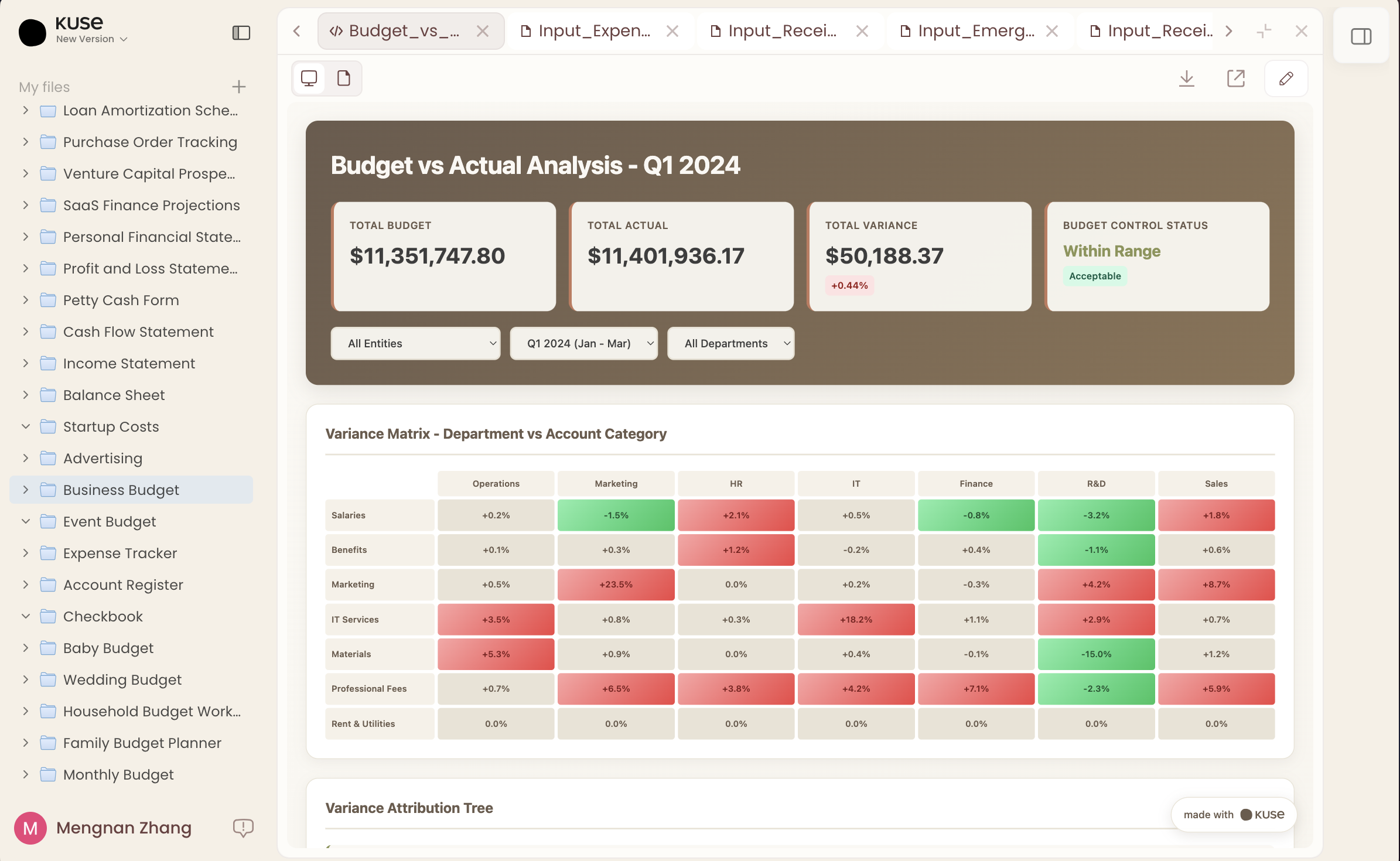
Kuse: You describe what you need ("Create a quarterly sales report with columns for region, revenue, and growth rate"), and Kuse generates a real, editable spreadsheet directly in your workspace. Need to adjust a column? Add a formula? Change formatting? You do it right there. The AI works with the file, not alongside it.
Claude: You describe the same task, and Claude responds with a well-structured text explanation , column headers, suggested formulas, maybe even sample data. But the output is text in a chat window. You then need to open Excel, create the file manually, and paste in the formulas one by one. For complex spreadsheets, this back-and-forth can eat up significant time.
Winner: Kuse , native file creation eliminates the copy-paste bottleneck entirely.

2. Data Analysis & Charts
Kuse: Upload your data or work with a spreadsheet already in your workspace, and Kuse can analyze trends, create summary tables, and generate charts and visualizations — all built in. You see the chart right next to your data. Need a bar chart instead of a line chart? Adjust it in place.
Claude: Claude is genuinely impressive at data analysis. Describe your dataset (or paste it into the chat), and it can identify patterns, suggest pivot table structures, write statistical analysis code, and explain insights clearly. But the analysis is text-based. There are no native charts, no interactive visualizations. If you want a chart, Claude might generate Python code using matplotlib — which you'd then need to run separately.
Winner: Kuse, built-in visualization means insights are immediately actionable, not just readable.

3. Workflow Integration
Kuse: This is where Kuse's all-in-one workspace model shines. Your spreadsheet lives alongside your documents and presentations. Need to reference sales data in a report? It's already there. Want to build a presentation deck from your quarterly numbers? Same workspace. No exporting, no switching apps, no broken links.
Claude: Claude is a standalone chat tool. It doesn't integrate with your file system, your document editor, or your presentation software. Every task starts and ends in the chat window. You're always the middleware, copying outputs from Claude into whatever tool actually needs them.
Winner: Kuse , the all-in-one workspace eliminates app-switching friction.
Who Should Use What?
Choose Kuse if you:
- Need to create, edit, or analyze Excel files as part of your regular workflow
- Want an AI that produces ready-to-use spreadsheets, not instructions
- Work with a team and need shared access to spreadsheets and documents
- Use documents, presentations, and spreadsheets together and want them in one workspace
- Want the most streamlined experience for spreadsheet-heavy work
Choose Claude if you:
- Need a general-purpose AI assistant for coding, writing, research, and reasoning
- Want to learn advanced Excel techniques (formulas, VBA, data modeling)
- Already have a spreadsheet workflow and just need an AI advisor on the side
- Work primarily with code and need help debugging or writing scripts
- Need deep analytical reasoning that goes beyond standard spreadsheet tasks
Use Both if you:
- Want Kuse for daily spreadsheet production work and Claude for complex problem-solving
- Need native file handling (Kuse) and advanced coding assistance (Claude)
Conclusion: Kuse Is the Better Claude Excel Alternative

The comparison comes down to a simple question: Do you want AI that talks about spreadsheets, or AI that works in spreadsheets?
Claude is an extraordinary AI — arguably one of the best conversational AI models available. For complex reasoning, coding, and general-purpose assistance, it's hard to beat. But for the specific use case of working with Excel files, Claude has a fundamental limitation: it's a chat tool, not a productivity tool.
Kuse was built for exactly this use case. It creates real spreadsheets, generates real charts, and lives in a workspace where your documents, slides, and data all connect. At $19.90/month — a hair under Claude Pro's $20 — you get a purpose-built solution rather than a workaround.
If you're searching for a Claude Excel alternative that actually handles spreadsheet files natively, Kuse is the answer.Ready to try it? Visit app.kuse.ai and see how AI-powered spreadsheets should work.
No. Claude can generate formulas, suggest spreadsheet structures, and write VBA macros, but all output is text-based. You need to manually create the file in Excel or Google Sheets and apply Claude's suggestions yourself. Kuse creates editable spreadsheet files directly inside the app.
No. Kuse is a purpose-built AI workspace with its own file system, native spreadsheet editor, document tools, and presentation builder. The AI works inside your files rather than chatting about them in a separate window. It's a productivity platform, not a chatbot skin.
Yes. You can upload existing .xlsx files into Kuse Workspace and continue editing them with AI assistance — add formulas, generate charts, clean up data, or restructure layouts, all within the app.
Absolutely. Many users pair Kuse for daily spreadsheet production (creating reports, building dashboards, analyzing data) with Claude for deeper reasoning tasks (debugging complex formulas, writing custom scripts, strategic analysis). They complement each other well.