Kuse for Excel:Turn Natural Language into Formulas, Charts, and Reports
Kuse is your agentic Excel coworker. This guide covers its core features: data analysis, AI chat, spreadsheet generation, and agentic workflows , so you can go from raw data to finished Excel files without writing a single formula.

Every Excel user knows the exact feeling. You know the business insight you need to extract from your data, but the formula syntax escapes you. You spend twenty minutes searching for an Excel tutorial online, looking up the right combination of INDEX and MATCH, or trying to figure out how to use xlookup excel properly just to clean up a simple data pull. You might even struggle with specific functions like excel mrand or plotting a complex quadratic graph for a report.
You do not need to memorize these complex functions anymore. You just need to describe what you want.
As a leading AI for excel, Kuse is designed for everyday professionals, from marketing managers analyzing campaign data to HR specialists organizing employee rosters. It acts as a bridge between traditional spreadsheets and advanced big data analytics tools, eliminating the friction between your raw data and your insights. By typing what you need in plain English, this excel ai delivers working files complete with formulas, charts, and formatted dashboards. You can try it today at kuse.ai/excel.
Four Core Features of Kuse Excel
1. Read and Analyze Upload any Excel or CSV file. Kuse automatically interprets the data, discovers underlying trends, and identifies potential issues without you having to write a single rule.
2. Selection Reference and AI Chat Whether it is a formatting operation or a complex calculation, you can simply highlight specific data on your sheet and ask Kuse directly in the chat interface to modify or explain it.

3. Generate from Scratch Describe what you need, and Kuse can create complete, multi-sheet Excel files with working formulas, beautiful charts, and proper formatting already built in.

4. Agentic Workflow Unlike basic chatbots, Kuse plans its own approach. It decides what analysis to run and delivers a complete, finished result, not just a text formula for you to copy and paste.
.png)
How Kuse Changes Your Workflow
Unlike basic plugins that just generate a text formula for you to copy and paste, Kuse operates as an agentic AI. It plans the steps, executes the formatting, and hands you a finished spreadsheet.
Step 1: Upload Your Spreadsheets Bring your messy CSV files or complex Excel workbooks to Kuse. The AI instantly understands the column headers, data types, and how different sheets relate to each other.
Step 2: Tell the AI Excel Formula Generator What You Need Use natural language prompts. You do not need to use technical jargon. As a powerful Excel formula generator, Kuse understands plain English.
Here are a few examples you can type directly into Kuse:
· Clean up this marketing export by removing duplicate emails and standardizing all dates to a single format.
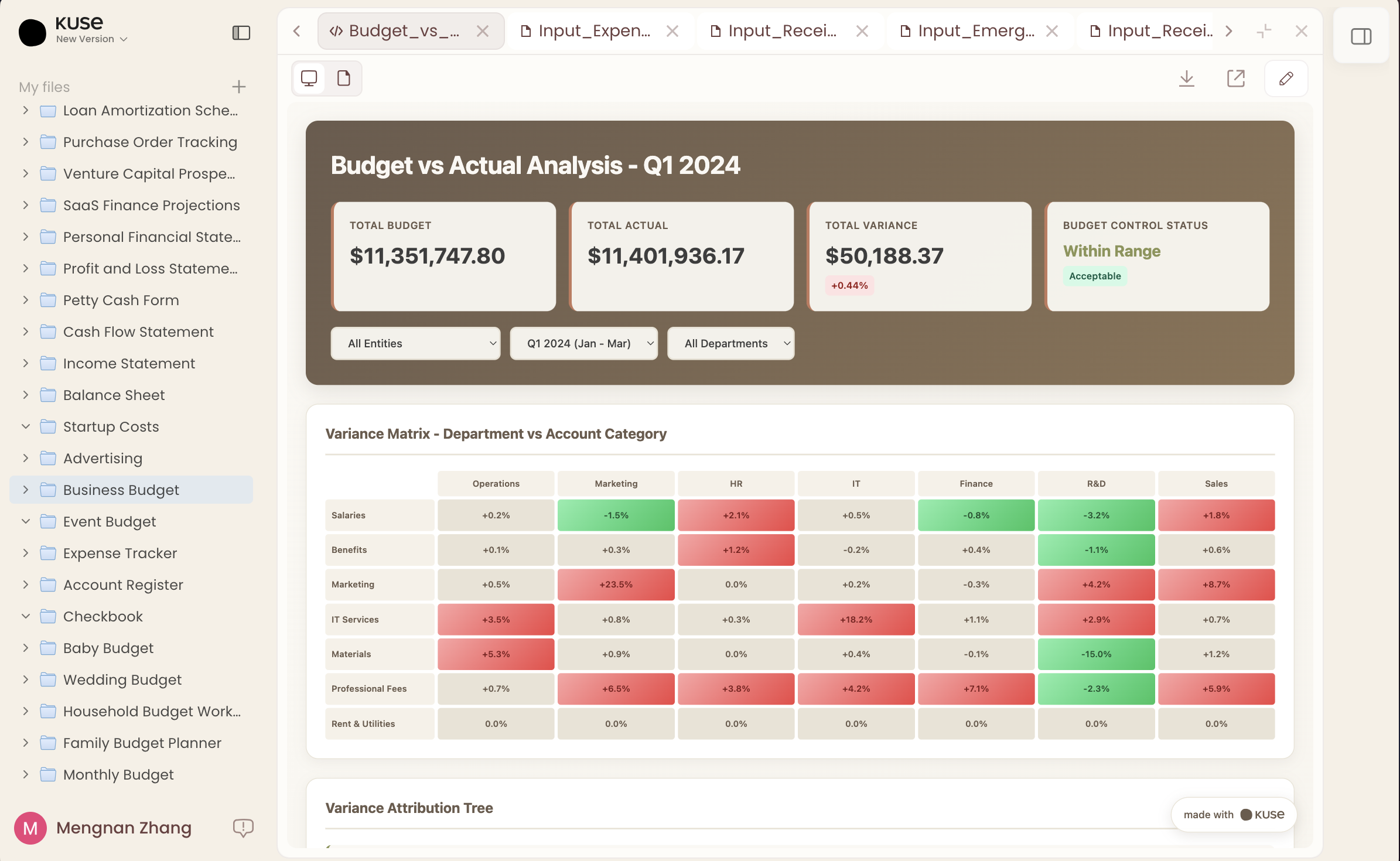
· Create a visual Excel dashboard showing our monthly revenue trend for 2025 with a bar chart for regional breakdowns.
· Generate a tiered commission formula for the sales team where anything under ten thousand gets five percent, and anything over gets eight percent.
Step 3: Download the Finished File Kuse processes the request and generates a downloadable file. The formulas are already applied, the data is clean, and the visualizations are ready for your presentation.
From Raw Data to Stunning Visualizations
Many users search the web thinking, I need ai tool for convert excel data in dashboard. Kuse is exactly the answer to that specific problem. It is not just about numbers and text; it is a comprehensive excel ai graph generator.
If you need to build an interactive dashboard for a quarterly review, Kuse acts as one of the most intuitive data visualization tools available on the market. You can instruct it to take raw financial data and instantly output an ai dashboard complete with an excel graph for revenue trends and a pie chart for expenses. Whether you are looking for free data visualization tools to get started with a small project or need a robust solution for daily team reporting, Kuse bridges the gap seamlessly.
.png)
Why Agentic AI is the Future of Excel
Most AI tools are transactional. You ask a question, and it gives you a piece of code. But spreadsheet work is a workflow. You have to clean the data, write the formula, build the chart, and format the output.
Kuse is different because it handles the entire workflow autonomously. You define the end goal, and Kuse maps out the route, ensuring you get a polished, presentation-ready file every single time.
Start Working Faster Today
Your analytical skills are your best asset; do not let formula syntax hold them back.
Visit kuse.ai/excel to upload your first file. The free tier gives you 100 credits every day, which is plenty of room to test these features and see the agentic workflow in action.
Kuse is an AI tool for Excel that lets you analyze data, generate formulas, and build dashboards using plain English instructions. Instead of writing formulas manually, you describe the result you want and Kuse produces a finished spreadsheet.
You simply describe the calculation or workflow you need, such as creating a commission structure or cleaning duplicate records. Kuse interprets the request, generates the necessary formulas, applies them to your spreadsheet, and returns a ready-to-use file.
Yes. Kuse can convert raw spreadsheet data into visual dashboards with charts such as bar charts, trend lines, and pie charts. It analyzes the dataset and automatically builds visualizations suitable for reporting or presentations.
Most tools only generate formula snippets. Kuse works as an agentic workflow system, meaning it plans the steps, cleans the data, writes formulas, creates charts, and outputs a completed spreadsheet rather than just text instructions.